txt文件转换为XML
很多目标检测的模型都是默认需要VOC的文件输入格式
手上数据label是txt文件。
为了避免不必要的bug,还是选择转换下格式
将数据按VOC形式放置
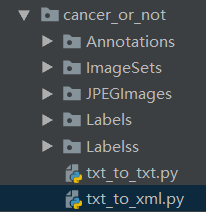
# -*- coding: utf-8 -*-
from xml.dom.minidom import Document
import os
import os.path
from PIL import Image
import importlib
import sys
importlib.reload(sys)
xml_path = “Annotations\”
img_path = “JPEGImages\”
ann_path = “Labelss\”
if not os.path.exists(xml_path):
os.mkdir(xml_path)
def writeXml(tmp, imgname, w, h, objbud, wxml):
doc = Document()
# owner
annotation = doc.createElement(annotation)
doc.appendChild(annotation)
# owner
folder = doc.createElement(folder)
annotation.appendChild(folder)
folder_txt = doc.createTextNode(“VOC2007”)
folder.appendChild(folder_txt)
filename = doc.createElement(filename)
annotation.appendChild(filename)
filename_txt = doc.createTextNode(imgname)
filename.appendChild(filename_txt)
# ones#
source = doc.createElement(source)
annotation.appendChild(source)
database = doc.createElement(database)
source.appendChild(database)
database_txt = doc.createTextNode(“The VOC2007 Database”)
database.appendChild(database_txt)
annotation_new = doc.createElement(annotation)
source.appendChild(annotation_new)
annotation_new_txt = doc.createTextNode(“PASCAL VOC2007 “)
annotation_new.appendChild(annotation_new_txt)
image = doc.createElement(image)
source.appendChild(image)
image_txt = doc.createTextNode(“flickr”)
image.appendChild(image_txt)
# onee#
# twos#
size = doc.createElement(size)
annotation.appendChild(size)
width = doc.createElement(width)
size.appendChild(width)
width_txt = doc.createTextNode(str(w))
width.appendChild(width_txt)
height = doc.createElement(height)
size.appendChild(height)
height_txt = doc.createTextNode(str(h))
height.appendChild(height_txt)
depth = doc.createElement(depth)
size.appendChild(depth)
depth_txt = doc.createTextNode(“3”)
depth.appendChild(depth_txt)
# twoe#
segmented = doc.createElement(segmented)
annotation.appendChild(segmented)
segmented_txt = doc.createTextNode(“0”)
segmented.appendChild(segmented_txt)
# threes#
object_new = doc.createElement(“object”)
annotation.appendChild(object_new)
name = doc.createElement(name)
object_new.appendChild(name)
name_txt = doc.createTextNode(cancer)
name.appendChild(name_txt)
pose = doc.createElement(pose)
object_new.appendChild(pose)
pose_txt = doc.createTextNode(“Unspecified”)
pose.appendChild(pose_txt)
truncated = doc.createElement(truncated)
object_new.appendChild(truncated)
truncated_txt = doc.createTextNode(“0”)
truncated.appendChild(truncated_txt)
difficult = doc.createElement(difficult)
object_new.appendChild(difficult)
difficult_txt = doc.createTextNode(“0”)
difficult.appendChild(difficult_txt)
# threes-1#
bndbox = doc.createElement(bndbox)
object_new.appendChild(bndbox)
xmin = doc.createElement(xmin)
bndbox.appendChild(xmin)
#objbud存放[类别,xmin,ymin,xmax,ymax]
xmin_txt = doc.createTextNode(objbud[1])
xmin.appendChild(xmin_txt)
ymin = doc.createElement(ymin)
bndbox.appendChild(ymin)
ymin_txt = doc.createTextNode(objbud[2])
ymin.appendChild(ymin_txt)
xmax = doc.createElement(xmax)
bndbox.appendChild(xmax)
xmax_txt = doc.createTextNode(objbud[3])
xmax.appendChild(xmax_txt)
ymax = doc.createElement(ymax)
bndbox.appendChild(ymax)
ymax_txt = doc.createTextNode(objbud[4])
ymax.appendChild(ymax_txt)
# threee-1#
# threee#
tempfile = tmp + “test.xml”
with open(tempfile, “wb”) as f:
f.write(doc.toprettyxml(indent=“t”, newl=“n”, encoding=“utf-8”))
rewrite = open(tempfile, “r”)
lines = rewrite.read().split(n)
newlines = lines[1:len(lines) – 1]
fw = open(wxml, “w”)
for i in range(0, len(newlines)):
fw.write(newlines[i] + n)
fw.close()
rewrite.close()
os.remove(tempfile)
return
for files in os.walk(E:ssd_pytorch_cancerdatacancer_or_notLabels):
print(files)
temp = “/temp/”
if not os.path.exists(temp):
os.mkdir(temp)
for file in files[2]:
print(file + “–>start!”)
img_name = os.path.splitext(file)[0] + .jpg
fileimgpath = img_path + img_name
im = Image.open(fileimgpath)
width = int(im.size[0])
height = int(im.size[1])
filelabel = open(ann_path + file, “r”)
lines = filelabel.read().split()
obj = lines[:len(lines)]
filename = xml_path + os.path.splitext(file)[0] + .xml
writeXml(temp, img_name, width, height, obj, filename)
os.rmdir(temp)
以上为个人经验,希望能给大家一个参考,也希望大家多多支持码农网。