需要用到的库:
tkinter:构建gui界面
pyperclip:复制功能
random:生成随机数
string:处理字符串
代码:
from tkinter import *
import random, string
import pyperclip
root =Tk()
root.geometry(“400×400”)
root.resizable(0,0)
root.title(“密码生成器”)
heading = Label(root, text = 密码 , font =arial 15 bold).pack()
pass_label = Label(root, text = 密码长度, font = arial 10 bold).pack()
pass_len = IntVar()
length = Spinbox(root, from_ = 8, to_ = 32 , textvariable = pass_len , width = 15).pack()
pass_str = StringVar()
def Generator():
password =
for x in range (0,4):
password = random.choice(string.ascii_uppercase)+random.choice(string.ascii_lowercase)+random.choice(string.digits)+random.choice(string.punctuation)
for y in range(pass_len.get()– 4):
password = password+random.choice(string.ascii_uppercase + string.ascii_lowercase + string.digits + string.punctuation)
pass_str.set(password)
Button(root, text = “获取密码” , command = Generator ).pack(pady= 5)
Entry(root , textvariable = pass_str).pack()
def Copy_password():
pyperclip.copy(pass_str.get())
Button(root, text = 复制密码, command = Copy_password).pack(pady=5)
root.mainloop()
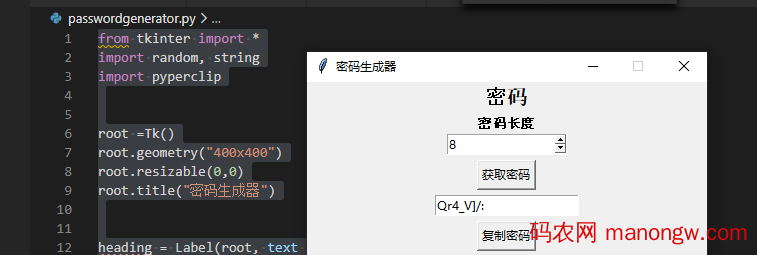
运行效果:
想要了解更多关于python的知识,资讯,实用工具欢迎关注python客栈

以上就是用python写一个带有gui界面的密码生成器的详细内容。